










 Loading...
GAME INFO
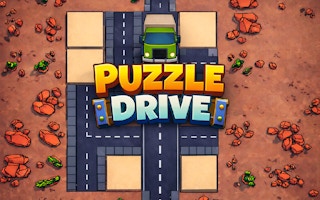
Puzzle Drive is a sliding road puzzle where you rearrange movable track sections to create a complete route for a waiting car. Swipe or drag road pieces in their permitted directions, connect the broken path, and the vehicle moves forward automatically when the route is ready. Completing puzzles earns coins and helps you progress toward new environments and increasingly involved layouts. You can explore this combination of cars and logic puzzles through ABCya3. The challenge is not about steering the car directly. Instead, you must study how each road tile can move, determine the correct order for repositioning the pieces, and avoid placing one segment where it blocks another important slide.
Puzzle Drive Game Overview
Puzzle Drive combines a car theme with compact spatial puzzles rather than traditional racing. The vehicle provides the goal, while the player concentrates on reorganizing road segments until there is a usable connection between the starting point and the destination. The game belongs to the sliding, logic, car, and casual puzzle genres. On ABCya3, this type of brain-focused browser challenge fits naturally among the varied titles available in the Other games collection. Each stage introduces a road layout with movable pieces. Some sections can slide horizontally, others vertically, and the correct solution may require several pieces to be repositioned in a specific order. When the required road is complete, the car advances without direct driving input. This keeps the emphasis on solving the arrangement rather than controlling acceleration, steering, or braking.Quick Facts
| Detail | Information |
|---|---|
| Game | Puzzle Drive |
| Genre | Sliding puzzle, logic, car, and casual |
| Developer | Balram Thakur |
| Publisher / Distributor | GamePix |
| Release Date | January 2, 2026 |
| Platform | Web browser on desktop, mobile, and tablet |
| Controls | Swipe or drag left, right, up, and down |
| Difficulty | Easy to learn with increasingly involved sliding layouts |
| Modes | Single-player |
What Is Puzzle Drive?
Puzzle Drive is a browser puzzle built around repairing or completing a road before a car can continue its journey. The road is divided into movable sections, and the player must shift those pieces until the correct route is formed. The car itself is not the main object you control. It waits for the route to become usable and moves forward after the required road connection has been completed. This creates a different experience from a conventional driving game. Speed and reflexes matter far less than understanding which road piece should move first and which space must remain available for another tile. Coins provide a visible reward for progression, while additional environments give the journey a changing visual backdrop. The fundamental puzzle remains focused on moving pieces efficiently enough to reconnect the road.Key Features
- Sliding road puzzles built around a car journey
- Road pieces that move horizontally or vertically
- Automatic car movement after a valid route is completed
- Coins earned while progressing through puzzles
- Additional environments that become available as you advance
- Increasingly complex arrangements with multiple movable sections
- Swipe-and-drag interaction on supported devices
- Desktop, mobile, and tablet browser support
- Single-player levels without direct car steering
Puzzle Drive Controls
Desktop Controls
- Mouse: Move the pointer over a movable road piece.
- Left Mouse Button: Click and hold a tile.
- Drag Left or Right: Slide a horizontally movable road section.
- Drag Up or Down: Slide a vertically movable road section.
- Release: Let go when the piece reaches the intended position.
Mobile and Tablet Controls
- Touch and hold: Select a movable road section.
- Swipe left or right: Move a piece along a horizontal path.
- Swipe up or down: Move a piece along a vertical path.
- Release: Complete the slide when the tile reaches a valid position.
How to Play Puzzle Drive
- Start the level and examine the broken road before moving any tile.
- Identify which road sections are movable and the directions in which they can slide.
- Locate the car’s starting position and determine where the completed road needs to lead.
- Drag or swipe a road tile along its permitted path.
- Move blocking pieces when necessary to create room for another section.
- Continue arranging the road until all required segments form a continuous route.
- Watch the car move automatically after the path has been completed correctly.
- Collect the available progression rewards and continue to the next puzzle.
- Use what you learned about tile movement when later stages introduce more complicated arrangements.
Difficulty and Progression
Early Puzzle Drive stages introduce the sliding system with a small number of movable road sections. These levels make it easy to see how a horizontal or vertical swipe changes the route. Later puzzles become more demanding when several movable pieces depend on each other. Moving one road section into its final position too early can prevent another tile from reaching the space it needs. This type of forward planning has similarities to Merge Royal, where a move that appears useful immediately can reduce the options available later. Puzzle Drive replaces cards and merging with spatial movement, but both reward players who consider more than one step at a time. Coins and new environments provide additional progression as puzzles are completed. A fixed total number of levels is not publicly confirmed, so players should use the stage indicators inside the current build to follow their progress.Puzzle Drive Tips and Strategies
- Study every movable tile first. Knowing which pieces travel horizontally and which move vertically can reveal the solution before the first swipe.
- Trace the road backward. Begin mentally at the destination and determine which sections must eventually connect to it.
- Move temporary pieces out of the way. A tile does not always need to move directly toward its final location on the first action.
- Protect useful empty spaces. Open positions allow other road sections to slide through the puzzle.
- Check what each move blocks. Before placing a tile, make sure another important section does not still need that space.
- Use small logical sequences. Break a complicated level into two- or three-move objectives instead of trying to solve the entire board at once.
- Change one step after getting stuck. When retrying, keep the successful part of your solution and adjust the earliest move that caused a blockage.
- Avoid random swiping. Moving every available tile usually makes it harder to remember the original arrangement and understand what changed.