





 Loading...
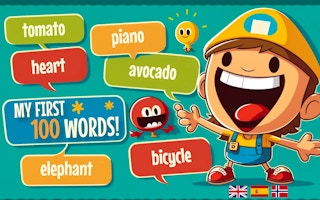
My First 100 Words is an educational memory game that uses visual prompts to introduce basic vocabulary. The current Kobadoo listing describes an emoji-based activity in English, Spanish, and Norwegian, with players selecting the images in the order in which the words are presented.
The earlier copy described the general idea correctly but lacked a precise source. This version adds the current developer credit, keeps the language information tied to the public listing, and avoids claiming that every embedded build contains identical levels or audio.
About My First 100 Words
The learning loop combines recognition and short-term memory. A player first sees or hears a sequence, then identifies the correct images in order. Longer sequences become harder because one early mistake affects every selection that follows.
The game is placed in the other category because the current site does not have a separate educational or word-games category. It is most useful when played in short sessions with time to repeat each word aloud rather than clicking through the prompts as quickly as possible. Browse more titles in the other collection.
My First 100 Words Game Information
| Game | My First 100 Words |
|---|---|
| Genre | Educational vocabulary and memory game |
| Developer | Eneagrama is credited on the current Google Play listing for Kobadoo First 100 Words |
| Platform | Browser or mobile-style touch interface depending on the hosted version |
| Main objective | Learn and recall basic vocabulary by matching emoji or picture prompts in the correct order. |
How to Play My First 100 Words
Choose the available language and begin with the shortest sequence. Look at each emoji or picture, connect it with the spoken or written word, and remember the order before making selections.
Select the images one at a time. When an answer is incorrect, repeat the full sequence instead of memorizing only the missed item. This helps build the relationship between word, image, and position.
For younger learners, an adult can say the words aloud and ask the player to name the image before tapping it. The game should support practice, not replace broader reading, speaking, and conversation.
My First 100 Words Controls
- Use the mouse to select emojis, pictures, language options, and interface buttons on desktop.
- Use touch controls on phones or tablets when the hosted build supports mobile input.
- Turn on sound when the version includes pronunciation or audio prompts.
- Follow the current screen because the order and interface can differ between versions.
Control mappings can change between desktop, mobile, and different embedded releases. When the game window displays instructions that differ from this guide, follow the prompt shown by the current build.
Key Features
- Visual vocabulary practice using emojis or pictures.
- Memory sequences that can increase in length.
- English, Spanish, and Norwegian in the current public Kobadoo listing.
- Simple mouse or touch interaction suitable for short learning sessions.
My First 100 Words Tips
- Say each word aloud before selecting the image.
- Group related words into a simple story or mental picture.
- Repeat a failed sequence from the beginning.
- Use short sessions to avoid guessing from fatigue.
- Ask the learner to describe the image in their own words.
A useful improvement method is to change one decision after each failed attempt. Adjust the route, timing, aim, purchase, or movement pattern, then use the next run to see whether that change solved the original problem.
Common Mistakes to Avoid
- Tapping quickly without naming or recognizing the word.
- Memorizing only the last item in a sequence.
- Assuming every hosted version supports the same languages or audio.
- Presenting the game as a complete language-learning curriculum.
Games Like My First 100 Words
These games share a related control style, genre, objective, or progression loop:
My First 100 Words FAQ
What does My First 100 Words teach?
The current public listing focuses on basic vocabulary through emoji-based recognition and memory tasks.
Which languages are listed?
The current Kobadoo listing names English, Spanish, and Norwegian. The options in the hosted version should be checked directly.
Who is credited as the developer?
Google Play credits Eneagrama for Kobadoo First 100 Words and identifies Juan Jambrina Martín in the developer information.
Is the game suitable for independent learning?
It can support vocabulary and memory practice, but younger learners may benefit from an adult who repeats, explains, and uses the words in conversation.
Final Thoughts
My First 100 Words is most valuable when the visual memory task becomes a reason to say and understand each word. Slow, repeated practice creates more learning value than treating the sequence as a speed challenge.
About ABCya3
For more browser games, practical control guides, and curated categories, visit ABCya3. The site organizes action, arcade, sports, driving, adventure, and casual titles so players can compare related games without relying on outdated ratings or unsupported claims.