









 Loading...
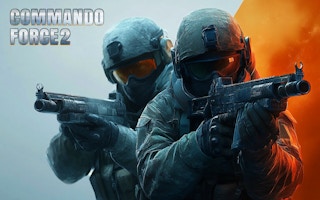
Commando Force 2 is a first-person shooter built around fast matches, varied firearms, and movement through compact combat maps. Current public descriptions mention team battle and free-for-all modes, but features can differ between the browser and mobile versions.
This revision removes old battle-pass promises and unsupported access language. It keeps the controls and tactics that remain useful across current builds: maintain cover, reload with space, manage grenades, and avoid standing in predictable firing lanes.
About Commando Force 2
Good positioning matters as much as aim. A player who enters an open area without checking corners can lose the fight before the weapon is fully raised. Moving between cover and controlling a small part of the map is more reliable than chasing every opponent.
Commando Force 2 belongs in the action category because the play loop depends on real-time shooting, movement, and short tactical decisions. Public listings currently disagree on the developer credit, so the article does not present one uncertain name as fact. Browse more titles in the action collection.
Commando Force 2 Game Information
| Game | Commando Force 2 |
|---|---|
| Genre | First-person shooter |
| Developer | Developer credits vary between current platform listings, so the embedded browser build should be checked before assigning a definitive studio |
| Platform | Browser and mobile listings; the web build is primarily suited to keyboard and mouse |
| Main objective | Enter team or free-for-all firefights, defeat opponents, and use weapons and movement effectively across the available maps. |
How to Play Commando Force 2
Begin by confirming the match type and loadout. In a team mode, follow allies and avoid creating isolated one-versus-many fights. In free-for-all, use the edges of the map to reduce the number of directions from which an enemy can appear.
Aim before exposing the entire character. Use short bursts at distance, reload behind cover, and change position after firing so opponents cannot hold the same angle.
Save grenades for grouped enemies, occupied rooms, or corners that are unsafe to enter directly. Sprinting and sliding can help cross an exposed lane, but using them without a destination often ends in a close-range ambush.
Commando Force 2 Controls
- WASD to move and the mouse to look around.
- Left mouse button to fire and right mouse button to aim when supported.
- R to reload, G to throw a grenade, and Spacebar to jump.
- C to crouch; Shift with movement may sprint, and some builds support a slide combination.
- Number keys or the mouse wheel can switch weapons; Esc or Tab may open the menu.
Control mappings can change between desktop, mobile, and different embedded releases. When the game window displays instructions that differ from this guide, follow the prompt shown by the current build.
Key Features
- First-person combat with multiple weapon types.
- Team battle and free-for-all modes described in current public listings.
- Movement options such as crouching, sprinting, jumping, or sliding in supported builds.
- Different maps and loadouts depending on the version.
Commando Force 2 Tips
- Reload only after reaching cover.
- Keep the crosshair near likely enemy height.
- Move after winning a firefight.
- Use grenades to clear dangerous corners.
- Listen and watch for enemies before entering an open room.
A useful improvement method is to change one decision after each failed attempt. Adjust the route, timing, aim, purchase, or movement pattern, then use the next run to see whether that change solved the original problem.
Common Mistakes to Avoid
- Reloading in the middle of a visible lane.
- Chasing opponents without checking side routes.
- Holding the same position after revealing it.
- Assuming the browser version includes every feature described on a mobile listing.
Games Like Commando Force 2
These games share a related control style, genre, objective, or progression loop:
Commando Force 2 FAQ
What modes are available in Commando Force 2?
Current descriptions mention team battle and free-for-all. The exact mode list should be confirmed in the hosted browser build.
What are the main controls?
The common desktop layout uses WASD, mouse aiming and shooting, R to reload, G for grenades, and additional keys for crouch, jump, sprint, or weapon switching.
Why is the developer field cautious?
Current public listings show different developer credits across platforms, so assigning one studio to the embedded version without checking it would be unreliable.
What should new players practice first?
Learn the map, reload behind cover, keep the crosshair ready at corners, and avoid taking fights from the middle of an open space.
Final Thoughts
Commando Force 2 is easier to approach when movement and cover are treated as part of aiming. Controlled routes and safer reloads produce more consistent results than constant sprinting toward the next target.
About ABCya3
Explore more browser games and updated gameplay guides on ABCya 3. The library connects each title with relevant categories and related games while keeping controls, features, and version-dependent details clearly separated.