









 Loading...
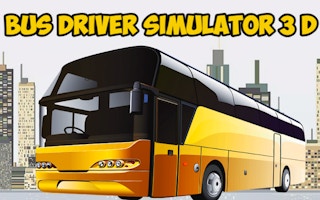
Bus Driver Simulator 3D is a 3D bus-driving simulation game built around a clear objective: drive large buses through different routes and environments while controlling speed, steering, stops, and traffic awareness. This guide replaces generic portal copy with practical information about the current game concept, controls, strategy, and the details players should check before starting.
About Bus Driver Simulator 3D
Bus Driver Simulator 3D focuses on handling a large vehicle rather than racing. Wide turns, braking distance, lane position, and route awareness matter more than raw speed.
Scenarios may use different buses, locations, camera views, and road layouts. The browser build can vary, so the in-game control panel should be treated as the final reference for any additional buttons.
Driving games become more manageable when you treat steering, speed, and braking as separate decisions. Smooth inputs are usually more reliable than last-second corrections.
Bus Driver Simulator 3D Game Information
| Game | Bus Driver Simulator 3D |
|---|---|
| Genre | 3D Bus-Driving Simulation Game |
| Main objective | Drive large buses through different routes and environments while controlling speed, steering, stops, and traffic awareness. |
| Developer or creator | Developer information varies across browser listings |
| Primary input | Use WASD to drive, Space for the handbrake, C to change the camera, G for the horn, Q and E for turn signals, and Esc to pause when supported. Mobile builds use on-screen controls. |
| Platform | Web browser; device support may depend on the embedded build. |
How to Play Bus Driver Simulator 3D
Begin with one slow test attempt instead of trying to achieve the best result immediately. Confirm the main success condition, identify what causes a failed run, and notice whether the game gives you a preview, timer, limited resource, or restart option. For Bus Driver Simulator 3D, your first priority is to drive large buses through different routes and environments while controlling speed, steering, stops, and traffic awareness.
The most useful early question is not “How do I play faster?” but “Which decision created the last problem?” A missed input, poor route, crowded board, unnecessary purchase, or badly timed movement usually points to a specific correction. Change that one decision on the next attempt and compare the result.
Bus Driver Simulator 3D Controls
Use WASD to drive, Space for the handbrake, C to change the camera, G for the horn, Q and E for turn signals, and Esc to pause when supported. Mobile builds use on-screen controls.
Activate the game window before using keyboard controls. When the embedded version shows instructions that differ from this guide, follow the in-game prompts because browser ports can use different key mappings, touch buttons, or interface layouts.
Key Features
- Large-vehicle driving with a slower, more deliberate handling model
- Multiple camera perspectives in supported builds
- Routes set in different cities or environments
- Keyboard and touch-control options depending on the device
Tips for Better Results
- Brake earlier than you would in a small car.
- Take wide turns and watch the rear of the bus near corners.
- Use the external camera while learning a route, then try the cockpit view.
- Reduce speed before intersections instead of correcting during the turn.
Improvement usually comes from repeatable decisions rather than one lucky attempt. Watch how the game responds, make a small adjustment, and keep the change only when it produces a clearer or more reliable result.
Common Mistakes to Avoid
- Entering corners too quickly
- Ignoring the bus's long body when changing lanes
- Using the handbrake as a normal braking method
Another common mistake is restarting too quickly. Let the result finish when possible, because the final movement, score calculation, board state, or failure animation can show exactly why the attempt ended.
Games Like Bus Driver Simulator 3D
Players who enjoy the main mechanic or pace of Bus Driver Simulator 3D can continue with these related games:
- Ultimate Flying Car — another option with a related mechanic, pace, or challenge style.
- Drive Mad — another option with a related mechanic, pace, or challenge style.
- Slope Racing 3D — another option with a related mechanic, pace, or challenge style.
- Park The Cars — another option with a related mechanic, pace, or challenge style.
Browse more Car Games games to find titles organized around a similar style of play.
Bus Driver Simulator 3D FAQ
What type of game is Bus Driver Simulator 3D?
Bus Driver Simulator 3D is a 3D bus-driving simulation game. Its main challenge is to drive large buses through different routes and environments while controlling speed, steering, stops, and traffic awareness.
How do I control Bus Driver Simulator 3D?
Use WASD to drive, Space for the handbrake, C to change the camera, G for the horn, Q and E for turn signals, and Esc to pause when supported. Mobile builds use on-screen controls.
Is Bus Driver Simulator 3D suitable for a short play session?
Yes. The basic rule can be learned quickly, although completing later stages, improving a score, or optimizing progression may require several attempts. You can stop after a short round and return when you want to continue.
Why might the controls or features look different?
Browser games can be distributed in more than one build. A desktop version may use keyboard and mouse controls while a mobile version displays touch buttons. Available modes, save behavior, advertising, and interface options can also vary by provider.
Final Thoughts
Bus Driver Simulator 3D is most rewarding when each retry has a purpose. Learn the central rule, avoid changing several things at once, and use the feedback from failed attempts to make the next run more controlled. The game does not need an exaggerated claim or an unsupported score to be useful; its value comes from whether the core mechanic remains clear, responsive, and enjoyable.
About ABCya3
ABCya 3 is an independent browser-game website that organizes action, adventure, arcade, driving, sports, puzzle, and casual games into clear collections. Each game page is intended to provide practical controls, gameplay guidance, related internal links, and content information so players can choose a suitable title before starting.