







 Loading...
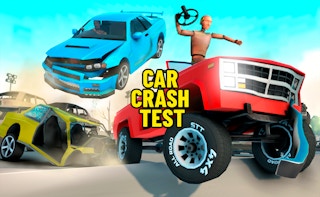
Car Crash Test is built around controlled destruction rather than conventional circuit racing. The player selects or drives a vehicle, builds speed, approaches obstacles, and studies how the car reacts when it hits ramps, barriers, traffic, or other environmental objects.
The previous copy mixed generic racing advice with claims that could not be verified. This revision concentrates on the visible simulation loop and makes clear that controls, vehicles, damage systems, and progression can differ between browser builds.
About Car Crash Test
A successful attempt is not always the fastest one. Entry angle, vehicle weight, speed, and the location of the first impact can change the result. A direct collision may create more visible damage, while a ramp or side impact can produce a longer chain of movement.
Car Crash Test fits the car-games category because driving remains the main input even when the objective is demolition. Players who want useful comparisons should repeat the same setup and change only one variable, such as speed or impact angle. Browse more titles in the car games collection.
Car Crash Test Game Information
| Game | Car Crash Test |
|---|---|
| Genre | Vehicle destruction and crash simulation game |
| Developer | CrashTime is credited on a current public browser listing; the embedded build should be checked before presenting this as a definitive credit |
| Platform | Web browser on desktop and supported mobile devices |
| Main objective | Drive vehicles through ramps, barriers, and crash scenarios while observing damage and completing the available challenges. |
How to Play Car Crash Test
Use the opening attempt to learn acceleration, steering response, braking distance, and the location of reset or camera controls. A simulator becomes easier to evaluate once you can reproduce the same approach consistently.
Line the vehicle up before accelerating. Late steering corrections often reduce speed or create a glancing hit that misses the intended obstacle. When the game includes ramps, keep the car straight during takeoff and avoid sharp inputs while airborne.
After impact, wait for the vehicle and camera to settle before restarting. Some versions award progress for destruction, distance, completed events, or unlocked vehicles, while others are designed mainly as an open crash sandbox.
Car Crash Test Controls
- Use the keyboard driving controls shown in the game, commonly WASD or the Arrow Keys.
- Use the available brake, handbrake, camera, slow-motion, or reset buttons only when they are displayed by the current build.
- On mobile, use the steering and pedal controls shown on screen.
- Check the game’s own instruction panel because crash-simulator builds often use different secondary keys.
Control mappings can change between desktop, mobile, and different embedded releases. When the game window displays instructions that differ from this guide, follow the prompt shown by the current build.
Key Features
- Vehicle handling combined with impact and damage physics.
- Ramps, obstacles, barriers, or demolition areas depending on the build.
- Repeatable scenarios that let players compare speed and angle.
- Camera and reset tools in versions that support closer crash inspection.
Car Crash Test Tips
- Make a straight test run before attempting complex stunts.
- Change one variable at a time when comparing crashes.
- Brake early when you need a precise impact point.
- Avoid oversteering immediately before a ramp.
- Use the reset control instead of forcing a damaged vehicle through a new test.
A useful improvement method is to change one decision after each failed attempt. Adjust the route, timing, aim, purchase, or movement pattern, then use the next run to see whether that change solved the original problem.
Common Mistakes to Avoid
- Assuming the highest speed always creates the most interesting result.
- Turning sharply at the last moment and missing the intended impact point.
- Ignoring the control panel for camera or reset inputs.
- Claiming a specific vehicle count or damage model without checking the embedded version.
Games Like Car Crash Test
These games share a related control style, genre, objective, or progression loop:
Car Crash Test FAQ
Is Car Crash Test a racing game?
Driving is central, but the main focus is usually vehicle damage, stunts, demolition, or crash experimentation rather than winning a traditional race.
What controls does Car Crash Test use?
Most browser versions use WASD or the Arrow Keys for driving, with additional keys for reset, camera, braking, or slow motion when supported.
Does every version have the same vehicles and maps?
No. Public browser and mobile listings can represent different builds, so vehicle selection, environments, and progression should be checked in the version hosted on the page.
How can I create more consistent crash tests?
Use the same vehicle and route, line up before accelerating, and change only one factor such as speed, obstacle, ramp, or impact angle.
Final Thoughts
Car Crash Test is most satisfying when approached as an experiment. Repeating a setup and making controlled changes reveals more about the driving and destruction systems than simply accelerating at the nearest obstacle.
About ABCya3
Explore more browser games and updated gameplay guides on ABCya 3. The library connects each title with relevant categories and related games while keeping controls, features, and version-dependent details clearly separated.